As has been discussed in other sections, determining the correct sound speed profile for your data sets is crucial to high quality multibeam sonar data. Understanding the science of sound travel and how it can affect your data will give you clues to finding the best sound speed profile, however it can still be something of an art rather than a science.
There can never be too many sources of sound speed profile data.
Ideally, SSP's are measured directly using CTD's or XBT's during the cruise. A conscientious investigator will measure sound speed profiles in a periodic manner, perhaps daily, and will take additional measurements based on bathymetric and meteorological variations. Still further measurements should be taken when the data itself shows signs of an erroneous profile.
This direct measurement method is most accurate and provides the best results. Typically results from these measurements, in the form of a table of depths and sound speeds, are input directly into the sonar. Subsequent data taken is processed by the sonar in real time with the correct sound speed profile, until of course ambient conditions change. The sound speed profiles should be retained in the event that later analysis requires adjustments.
Note
Never forget a good quality sound speed profile is never a substitute for a poor keel water temperature input to the sonar. No amount of post processing can correct the beam forming errors that result from an incorrectly measured water temperature at the hydrophone array.
Unfortunately, not all investigators are as conscientious as the post processor might like. XBT's can be expensive and because cruises are full of activity, the quality of the sonar data is not always carefully watched.
Alternatively, sound speed profiles can be calculated from data collected in areas where the bottom is flat and the depth is known and that are in close proximity to the rest of the data set. Investigators often build these calibration tracks into their data to allow for an additional input for SSP processing.
SSP's can also be calculated from historical temperature, salinity and depth (pressure) tables. Environmental parameters of some ocean regions change little of the course of the year and for these areas historical data can often provide good estimates. In other ocean regions where there is considerable variability historical data is less helpful.
The MB-System™ package provides a historical database of temperature and salinity values with depth as well as the mblevitus function for extracting sound speed profiles from this data. It's described well in the mblevitus man page:
       mblevitus  generates  a  mean water sound velocity profile
       for a specified location using  temperature  and  salinity
       data from the 1982 Climatological Atlas of the World Ocean
       [Levitus, 1982].  The water velocity profile is  representative
         of  the  mean  annual water column structure for a
       specified 1 degree by 1 degree  region.   The  profile  is
       output  to  a specified file which can be read and used by
       programs (e.g. mbbath or mbvelocitytool)  which  calculate
       swath sonar sonar bathymetry from travel times by ray tracing
        through a water velocity model.
More on mblevitus later.
Like the roll bias example above, the data sets used in this example are taken from a Pacific Ocean transit aboard the R/V Ewing, rather than the example Lo'ihi data set we have been using to illustrate examples. The data and sound speed profiles can found in the mbexamples/cookbookexamples/other_data_sets/ssp/ directory.
In practice SSP's are gathered from as many sources as possible. These are then compared and manipulated while simultaneously observing the effects on a portion of the sonar data. In this way, the best composite profile can be determined. MB-System™ provides mbvelocitytool as an interactive way to accomplish this as we will see.
Our example data set from the R/V Ewing taken in the spring of 2002 in the North Pacific during a non-science transit. Although every ship is different, the general procedure for the measurement and analysis of data to determine the sound speed profile is essentially the same. A simple procedure follows:
Review the chart to find a planar portion of sea floor for data collection. Analysis of the impact of changes to a sound speed profile on a data set is greatly eased, if the sea floor is in fact flat (not just planar), although this is not imperative.
Brief the Captain and the Mate. If the ship's speed adversely affects the quality of data you may want to request a slower speed. If prevailing winds or seas have adverse affects on certain headings, you may want to request an alternate heading to mitigate these effects. Make sure the Captain and the Mate are aware of where and when you plan to launch the XBT or CTD as they have ship's speed requirements as well.
Ensure any software/hardware preparations required for XBT launch are complete.
Then simply note the start and stop times of the data run and the time/Latitude and Longitude of the XBT/CTD launch.
For this data set, an XBT was launched over a planar section of sea floor in the North Pacific, and a small 10 minute section of data coinciding with that location was chosen.
Here are the first few lines of the text file result produced by our Sparton™ XBT launch:
SOC BT/SV PROCESSOR
01/05/102
08:45
3
2
R/V Ewing
ew0204 4may z
41:01:00N
168:23:0E
5700 m.
5 kts.
10.4 c
0.00    15.639
0.68    13.126
1.37    11.467
2.05    10.945
2.73    10.801
3.41    10.749
4.10    10.743
...
The XBT provides depth and temperature, but depth and sound speed values are required. MB-System™ provides the script mbm_xbt to convert depth and temperature values to depth and sound speed.
Note
XBT's providing only depth and temperature make the assumption that salinity effects on sound speed are due to a bulk difference in salinity rather than gradients in the vertical water column. In the open ocean away from ice or shorelines, this is a good assumption. However in polar regions or near shoreline runoff, CTD's should be used.
mbm_xbt supports data from two types of XBT's, the NBP MK12 and the Sparton. It is a sophisticated little script that optionally takes a local salinity for bodies of water outside the nominal 35 ppt as well as the ship's latitude to correct for pressure differences with depth that occur as a result. (Unless otherwise specified mbm_xbt assumes a salinity of 35 ppt and a latitude of 0.) Our results are below:
# Sparton XBT data processed using program mbm_xbt
# SOURCE:              SOC BT/SV PROCESSOR
# DATE:                01/05/102
# TIME:                08:45
# UNKNOWN PARAMETER:   3
# UNKNOWN PARAMETER:   2
# SHIP:                R/V Ewing
# CRUISE:              ew0204 4may z
# LATITUDE:            41:01:00N
# LONGITUDE:           168:23:0E
# DEPTH:               5700 m.
# SPEED:               5 kts.
# SURFACE TEMPERATURE: 10.4 c
0.00 1508.67
0.68 1500.60
1.37 1494.98
2.05 1493.17
2.73 1492.68
...
To complement the XBT measurement it is always worth while to calculate SSP's from the Levitus database. If you have installed the Levitus database correctly as part of your MB-System™ installation (usually LevitusAnnual.dat in your $MBSYSTEM/share directory), one SSP will be calculated for you automatically when you load your data file into the mbvelocitytool application. However, it is best to calculate several profiles around the data set to ensure the data set does not fall in a historical thermal front. We have used +/- 1 degree increments to provide several sound profiles around the center location of the data file. To get a center Lat and Long we look at the "Limits" section of the mbinfo process executed on the data file for which we will conduct our sound speed analysis:
Limits:
Minimum Longitude:     168.6078   Maximum Longitude:     168.7523
Minimum Latitude:       41.1646   Maximum Latitude:       41.2759
Minimum Sonar Depth:     4.8000   Maximum Sonar Depth:     7.0000
Minimum Altitude:     5667.3852   Maximum Altitude:     5689.2592
Minimum Depth:        5556.8645   Maximum Depth:        5920.7173
Minimum Amplitude:       9.0000   Maximum Amplitude:     246.0000
Minimum Sidescan:        3.0000   Maximum Sidescan:      255.0000
The first few lines of a typical result from mblevitus is shown below:
mblevitus -R168.5/41.5 -O168E41N.svp -V

# Water velocity profile created by program MBLEVITUS version $Id: 168E41N.svp,v
 1.1.1.1 2002/10/31 22:07:08 dale Exp $
# MB-system Version 5.0.beta12
# Run by user <vschmidt$gt; on cpu <grampus> at <Sat May  4 07:33:49 2002>
# Water velocity profile derived from Levitus
# temperature and salinity database.  This profile
# represents the annual average water velocity
# structure for a 1 degree X 1 degree area centered
# at 168.5000 longitude and 41.5000 latitude.
# This water velocity profile is in the form
# of discrete (depth, velocity) points where
# the depth is in meters and the velocity in
# meters/second.
# The first 32 velocity values are defined using the
# salinity and temperature values available in the
# Levitus database; the remaining 14 velocity values are
# calculated using the deepest temperature
# and salinity value available.
0.000000 1498.003662
10.000000 1497.996826
20.000000 1497.213379
30.000000 1496.007935
50.000000 1492.968628
...
So with several sound speed profiles in hand, from the Levitus database and those we've measured directly, we use mbvelocitytool to assess the quality of these sound speed profiles.
mbvelocitytool is an interactive program that allows one to load several sound speed profiles and a data set to see how manipulations to those sound speed profiles affect the data in real time.
mbvelocitytool is launched simply with:
>mbvelocitytool
An interactive application will launch as shown here:
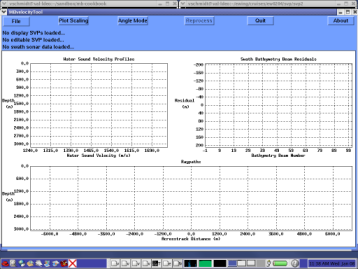
The strategy of mbvelocitytool is to compare an editable SSP with the measured and calculated SSP's we previously collected, and see the effects of our editing in real time on a real data set.
Note
There's bound to be a bit of confusion with regards to terminology used in this manual and that used in the MB-System™ software as they are slightly different. For example, while the term "Sound Speed Profile" is technically more correct, and is used in this manual exclusively, "Sound Velocity Profile" has been used historically. Even the MB-System™ tools refer to "velocity" - mbvelocitytool for example, and "SVP" rather than SSP. The use of SSP over SVP is a pet peeve of the author, but please don't be confused by this. You'll see both used interchangeably in many places and certainly in MB-System™ - something to live with for the moment.
If we first select "File->New editable profile" we'll see a line a line with four (one is hidden somewhat at the top) handles (dots) appear on the "Water Sound Velocity Profile" plot. The handles allow graphical editing of the profile by the "drag and drop" method on the file handles.
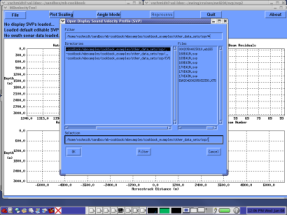
If we select "File->Open editable profile" we'll see a dialog box that will allow us to browse to the location of our sound speed profiles. Find /mbexamples/cookbookexamples/other_data_sets/ssp and load the XBT SSP identifiable by an "sv" suffix. See the figure below:
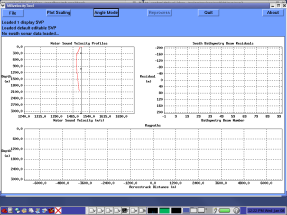
You'll find the XBT sound speed profile plotted in red on the "Water Sound Velocity Profiles" plot. Why does the data extend down only 2000 meters of water depth? The model of XBT used in this example is good only to that depth, but more importantly, changes in the SSP below the thermocline are entirely due to changes in pressure with depth - so we need not measure much below the thermocline to have a good idea of the shape of the SSP at deeper depths. Here's an illustration:
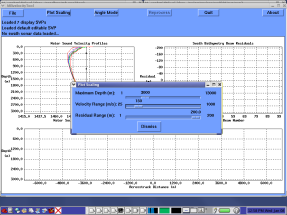
In the same manner as above, load the remaining SSP's generated by mblevitus. They will be added to the plot in various colors to make them easily distinguishable. In an effort to better see the differences between them, we can adjust the scale of the plot by selecting the "Plot Scaling" button. Slide the "Velocity Range" scale to 150. You'll probably be able to see the plot change scale in the background as you let go the mouse. Click "Dismiss" to close the Plot Scaling window.
With out SSP's loaded we can turn to loading our data set. The process is much the same - select "File->Open swath sonar data". Browse to the file, and ensure the correct format is specified in the dialog box before clicking Open. One additional SSP will be calculated for your swath data from the Levitus database automatically. Before we discuss the details of the various plots, let us adjust the plot scaling,"Maximum Depth" to something near 6000 meters. Here is the result:
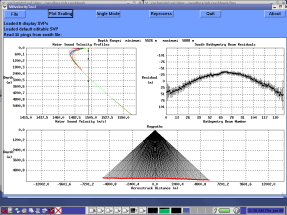
When the loaded sonar data contains raw beam angles and travel times, the path the sonar traveled to the sea floor is calculated and displayed in the "Raypaths" plot. The first good data value in each beam is displayed from the data file (most from the first ping) to allow one to see realtime results of interactive editing. Based on the current SSP a line is fit to the across track profile of each ping and the difference between each bathymetry value and the linear fit is calculated. These are then averaged across the loaded data file and plotted as "residuals" in the upper right hand plot. Bathymetry values that are shallower than the fit are negative while those deeper are positive and the standard deviation of the averages are plotted as error bars.
Next we adjust our editable sound speed profile to approximate the loaded profiles. Place the cursor over one of the handles (dots), click with the left button and drag the profile as is appropriate. Often you will find that the four handles provided are not enough to adequately shape the profile. Additional handles can be added by placing the cursor over the portion of the profile that a handle is desired and clicking the center mouse button. Below the profile has been edited as described.
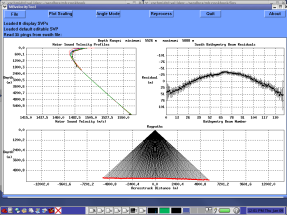
You may have noticed that the ray tracing and residuals plots did not change while we edited our profile. These are updated with a click of the "Reprocess" button. Before we do that however, it will be helpful if we adjust our residual plot scaling. Because our example data set is of good quality, a value of 50 meters is appropriate. Now reprocess the data and note the changes in the Residuals plot.
Here on out, one iteratively adjusts the profile to both flatten the residual plot and minimize the error bars. Meanwhile, the raytracing profile should present a creditable representation of the sea floor.
With the sound speed profile adjusted to your liking, on can save the "editable" sound speed profile by selecting the appropriate choice under the "File" button.
REVISITED WITH A MORE DETAILED DISCUSSION OF THE EDITING PROCESS.
INSERT A DISCUSSION REGARDING SAVING RESIDUALS AND APPLYING THEM TO A DATA SET AND WHEN IT IS APPROPRIATE TO DO SO.